Filings
The Filings view lets you browse a company's regulatory filings and read them inline, without leaving the app.
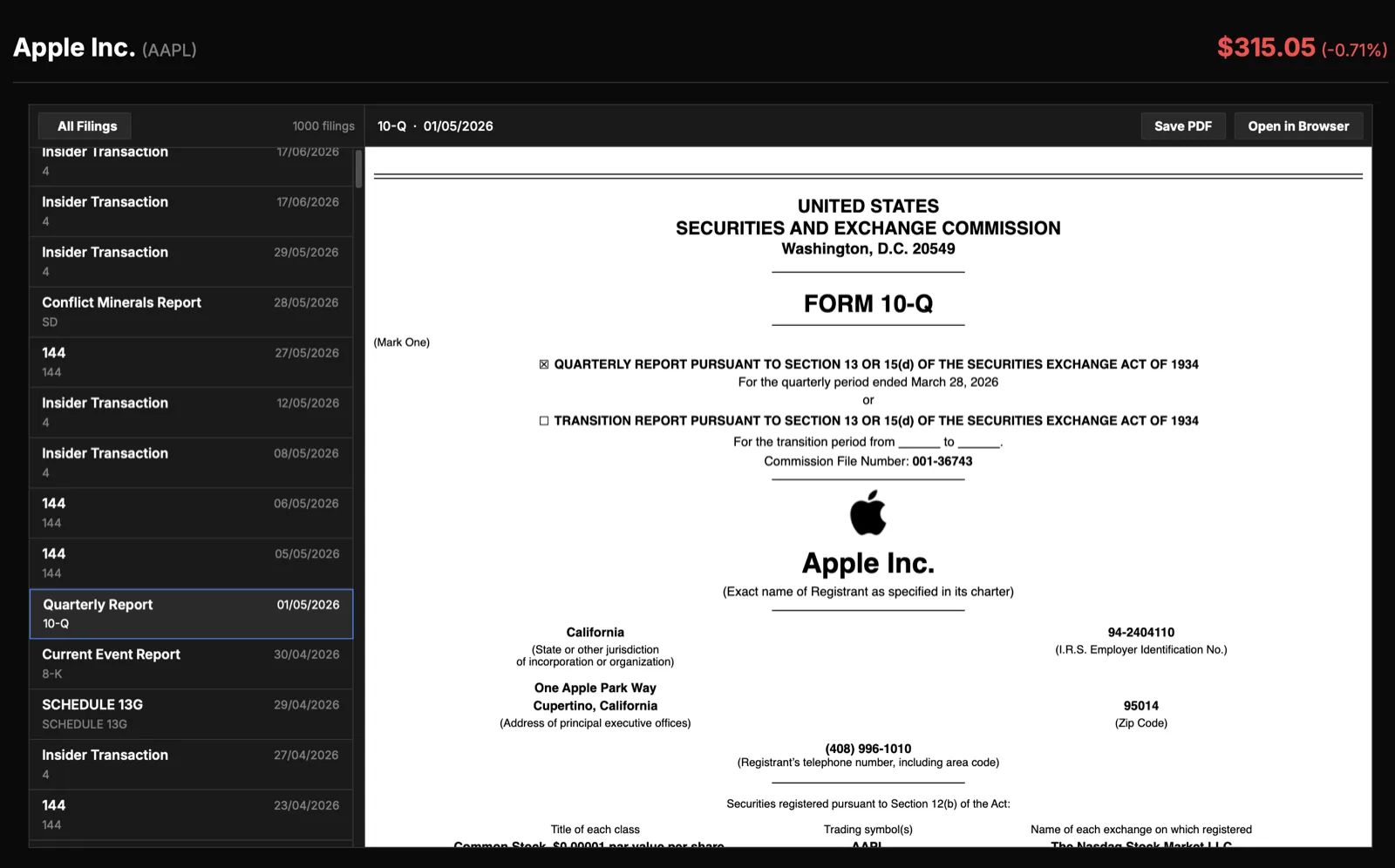
What you'll see
- A filing list (newest first) showing each filing's type and date, with a live count of how many are loaded.
- A filter dropdown listing the form types the company has actually filed.
- A document viewer that displays the selected filing's primary document, with Open in Browser and Save PDF buttons.
What you can do
- Click a filing to open it in the viewer.
- Filter by form type using the filter dropdown at the top.
- Load earlier filings to fetch older history on demand.
- Use the viewer's native find (Ctrl/Cmd+F) to search within the open document.
Form types you may see
The form type tells you what a document is for and how much detail to expect. The common types fall into a few groups.
US company reports
- 10-K: the audited annual report. It is the most complete disclosure a US company files, covering the full business description, risk factors, management's discussion of results, and audited financial statements. When you want the authoritative version of a year's numbers and the context around them, this is the filing to read.
- 10-Q: the quarterly report. It updates the financial statements between annual reports and is unaudited, so it is timelier but lighter than the 10-K.
- 8-K: a current report for material events. Companies file it when something happens that investors should know about promptly, such as earnings releases, executive changes, acquisitions, or major agreements.
Foreign company reports
- 20-F: the annual report for a foreign private issuer. It plays the same role as the 10-K, giving the full business, risk, and audited financial disclosure for a company based outside the US that lists its shares there.
- 6-K: an interim report for foreign private issuers. It carries material updates and periodic results filed between annual reports, roughly filling the role that the 10-Q and 8-K serve for domestic companies.
Ownership and insider activity
- Forms 3/4/5: insider ownership filings. Form 3 reports an insider's initial holdings, Form 4 reports changes as they buy or sell, and Form 5 is an annual catch-up for transactions not reported earlier. Together they show what directors, officers, and large holders are doing with their own shares.
- 13F: a quarterly disclosure of the equity holdings of large institutional investment managers. It shows what professional managers owned at quarter end.
- SC 13D/G: a beneficial ownership filing made once an investor crosses a significant ownership threshold. The 13D version signals an active or activist stake, often with intentions for the company, while the 13G version reports a passive holding.
Governance
- Proxy statement: the document sent ahead of a shareholder meeting. It covers governance matters put to a vote, board nominees, executive compensation, and other proposals shareholders will decide on.
Reading a figure back to its source
The Financials view can link directly into these filings. As a beta feature, clicking a number in Financials opens the exact filing in a dedicated viewer window, which lets you confirm the value, read the surrounding disclosure, and see how the company presented it.
Tip
When available, use the click-to-source link whenever a number looks surprising. Opening the filing shows the footnotes and context that a single figure cannot.